
• Feeling isolated? You're not alone.

    Join 20,000+ people who understand exactly how your day went. Whether you're newly diagnosed, self-identified, or supporting someone you love – this is a space where you don't have to explain yourself.

    Join the Conversation → It's free, anonymous, and supportive.

    As a member, you'll get:

    • A community that actually gets it – no judgment, no explanations needed
    • Private forums for sensitive topics (hidden from search engines)
    • Real-time chat with others who share your experiences
    • Your own blog to document your journey

    You've found your people. Create your free account

Excel Spreadsheet Formula Help Please

Magna

Well-Known Member
V.I.P Member
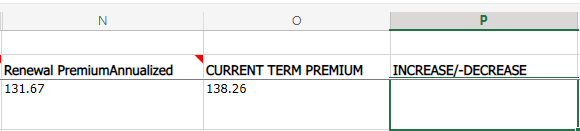
I have to do something in Excel and I'm not able to make a simple formula work. Here is a screenshot of a section of my spreadsheet:
Screenshot-2022-11-30-121625.png


What I want to do is subtract the N3 cell value (131.67) from the O3 cell value (138.26) and I want the result to show in cell P3. I realize the answer given will be: -6.59 which is what I need. The reason I need to do a formula that works is that there are over 400 cells in the O and N columns that need the same outcomes and I don't want to have to manually calculate each P cell value for each row.

I do NOT want to add the two cell values together (e.g. 131.67+138.26=269.93)
Sometimes the number in the N column cell in a row will be higher than the number in the O column of that same row and sometimes it will be less. So the result in the P column for each row will sometimes be a positive number and sometimes a negative number.

I can't figure out how to do it.

Does anyone know how to do this?
 
Last edited:
I have to do something in Excel and I'm not able to make a simple formula work. Here is a screenshot of a section of my spreadsheet:

Screenshot-2022-11-30-121625.png


What I want to do is subtract the N3 cell value (131.67) from the O3 cell value (138.26) and I want the result to show in cell P3. I realize the answer given will be: -6.59 which is what I need. The reason I need to do a formula that works is that there are over 400 cells in the O and N columns that need the same outcomes and I don't want to have to manually calculate each P cell value for each row.

I do NOT want to add the two cell values together (e.g. 131.67+138.26=269.93)
Sometimes the number in the N column cell in a row will be higher than the number in the O column of that same row and sometimes it will be less. So the result in the P column for each row will sometimes be a positive number and sometimes a negative number.

I can't figure out how to do it.

Does anyone know how to do this?
It doesn't work to put in a formula like "=O3-N3"? I know that if you go into the cell calculation settings, you can pick how negative numbers are displayed. I don't have a laptop with me now, so I don't think I can help you more. Like @Aspychata mentioned, it's often best to use an online search tool like Google when you have problems. That's what I tend to do when I have issues with Excel, and there are a lot of resources.
 
It doesn't work to put in a formula like "=O3-N3"? I know that if you go into the cell calculation settings, you can pick how negative numbers are displayed. I don't have a laptop with me now, so I don't think I can help you more. Like @Aspychata mentioned, it's often best to use an online search tool like Google when you have problems. That's what I tend to do when I have issues with Excel, and there are a lot of resources.
You saved the day! I was making it more complicated that I needed to. =sum(N3-O3) worked perfectly.

Thanks for your help. I did go to Google first but didn't find an answer that made sense to me.
 

New Threads

Top Bottom