• Feeling isolated? You're not alone.

    Join 20,000+ people who understand exactly how your day went. Whether you're newly diagnosed, self-identified, or supporting someone you love – this is a space where you don't have to explain yourself.

    Join the Conversation → It's free, anonymous, and supportive.

    As a member, you'll get:

    • A community that actually gets it – no judgment, no explanations needed
    • Private forums for sensitive topics (hidden from search engines)
    • Real-time chat with others who share your experiences
    • Your own blog to document your journey

    You've found your people. Create your free account

Windows 8.1: Issues with the computer clock

Vanilla

Your friendly neighbourhood hedgehog
V.I.P Member
Hey everyone :)

Thought I'd check to see if anyone else has come across this issue before. I've recently gotten a new PC, and have now got Windows 8.1 (from Windows 7). I've noticed an issue with the clock; it seems to either stand frozen, or will creep at a glacial pace (not just the time, but the date too). Playing with various settings doesn't seem to help, and manually setting the time proves fruitless too. I've also googled the issue, and found that several others are also experiencing issues; though I've yet to come across a resolution for this.

Interestingly too, I've noticed that I'm unable to access this site if the date is incorrect on my machine; which does require me to then fiddle with the date and time settings, before being able to view the forums.

Thanks in advance!
 
A recently acquired computer, eh? I'd rule out the obvious before assuming it's an OS or BIOS issue. Windows periodically synchronizes their software clock with the real-time clock in your computer's BIOS.

My suggestion would be to replace your CMOS (motherboard) battery. If that battery is sufficiently drained, clock/time synchronizing becomes a mess because the BIOS can't keep up with the OS.

Computers you buy might be "new", but there's no telling about the CMOS battery that comes with them. I prefer to replace them on the outset myself to rule out such possibilities. Make sure you get precisely the correct battery for your computer. (Not all systems use a CR2032 battery.)

How to replace the CMOS battery.
 
Last edited:
A recently acquired computer, eh? I'd rule out the obvious before assuming it's an OS or BIOS issue. Windows periodically synchronizes their software clock with the real-time clock in your computer's BIOS.

My suggestion would be to replace your CMOS (motherboard) battery. If that battery is sufficiently drained, clock/time synchronizing becomes a mess because the BIOS can't keep up with the OS.

Computers you buy might be "new", but there's no telling about the CMOS battery that comes with them. I prefer to replace them on the outset myself to rule out such possibilities. Make sure you get precisely the correct battery for your computer. (Not all systems use a CR2032 battery.)

How to replace the CMOS battery.
Thanks Judge, I'll give that a go :)
 
Thanks Judge, I'll give that a go :)

Well, it may not be the problem, but it's one of the simplest solutions to ponder before going onto more complex issues. This does happen a lot though because it's so easy to buy a computer with a depleted CMOS battery. Most folks don't mess with their BIOS settings so when the BIOS is reset because of battery issues users don't necessarily catch it. But the one big thing they do catch is the time when it's off a little- or a lot!
 
Well, it may not be the problem, but it's one of the simplest solutions to ponder before going onto more complex issues. This does happen a lot though because it's so easy to buy a computer with a depleted CMOS battery.
Having a place to start is always good. Everything else I've tried hasn't gotten me anywhere :P
 
Figured it out :p

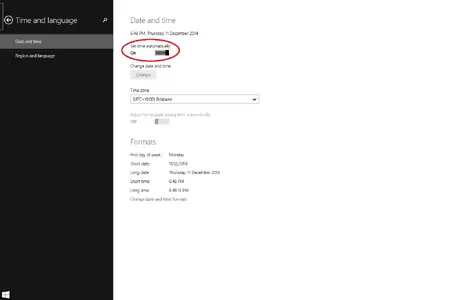
For anyone else who runs in to this problem, there is a setting you need to switch on, in order for the time to actually sync with the right time. It doesn't matter what settings you have on your clock's settings, apparently. This setting is located in the Control Panel. As soon as I switched it on, I've not had any more problems...at least, not yet. Not sure why it was set to off as it's default though...

Windows 8.1 - Issue with clock.webp
 

Attachments

  • Windows 8.1 - Issue with clock.webp
    Windows 8.1 - Issue with clock.webp
    21.7 KB · Views: 251
You might also consider resetting the synchronization of another Internet Time Server.

To select another time server other than Microsoft's. Apparently in the past keeping time with Microsoft has been problematic. Might be why they chose to default to the setting being in the "off" position, rather than default to it being on some other (government) server.

Heaven forbid they admit to having made a proprietary error! But then it's all brought to you by the guys who gave us Windows 8.1, who want to distance themselves from it by offering the redux as Windows 10. :p
 
Last edited:
You might also consider resetting the synchronization of another Internet Time Server.

To select another time server other than Microsoft's. Apparently in the past keeping time with Microsoft has been problematic. Might be why they chose to default to the setting being in the "off" position, rather than default to it being on some other (government) server.

Heaven forbid they admit to having made a proprietary error! But then it's all brought to you by the guys who gave us Windows 8.1, who want to distance themselves from it by offering the redux as Windows 10. :p
Thanks for your help Judge :)
 

New Threads

Top Bottom